Moving on from SOUPS, I took a look at the proceedings from the Conference on Computers and Communication Security (CCS) and the first paper to catch my eye was the work by Seiler-Hwang et al. The thing that stuck out about their work was that they studied a particular security tool that was popularized on desktops, in this case password managers (PMs), and sought to understand the usability issues when used on a mobile device.
Setting the stage
For those who aren’t familiar with password managers, they’re digital wallets or vaults that assist in storing passwords or other secrets associated with different sites and services. In addition to simply storing passwords, they can help with password generation. While they can be immensely helpful, their usage is not widespread. According to two studies cited in the paper, password manager usage was seen to be at 17.6% [1] in 2016 and 16.7% [2] in 2018. However, mobile password manager usage is only at 6.8% [1]. The hypothesis is that usability issues are a factor and the authors seek to find out what those issues are.
So what did they do?
The authors conducted a usability study of four popular password managers: Dashlane, LastPass, Keeper, and 1Password. Each participant had to complete seven tasks ranging from installing and registering on the PM app to adjusting the security configurations of the PM.
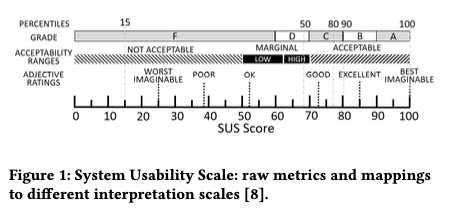
They evaluated their study using two tools: the standard System Usability Scale (SUS) and PACMAD (People at the Center of Mobile Application Development). Before reading this paper, I didn’t know that certain SUS scores were used to describe general usability; for example, SUS scores of at least 70 mean the product is acceptable. You can see the other mappings in the figure below. PACMAD is an evaluation framework specific for mobile devices that focuses on seven attributes: effectiveness, efficiency, learnability, memorability, errors, and cognitive load. They were able to evaluate these different attributes through the SUS, NASA Task Load Index, and a set of questionnaires.
They recruited participants through MTurk and had 20 participants complete the seven tasks for each of the four PMs, resulting in 80 sets of responses. The user population that took part in the study was predominantly male, well educated, skewed young, and mostly Android users. So the authors say that their results might not generalize well.
Certain password managers are better than others
When looking at both the PACMAD attributes and the SUS scores for each of the PMs, there were some interesting results. Let’s first start by looking at some of the PACMAD attributes.
PACMAD
When evaluating the effectiveness of the four PMs, they all had a 90% success rate on average when combining the results from each of the tasks, which is considered good. However, the task that had the lowest success rate was one which required the participant to download a native app for a service and log in using a password stored in the PM. Participants were confused about the need to enable certain system-level permissions in order to enable auto-fill functionality. The authors hypothesize that this confusion is a result of a knowledge gap between certain groups of users.
In contrast to effectiveness where each PM performed similarly, there were statistical differences found in the learnability of the different PMs. Dashlane proved to have the highest learnability value (M = 75.6), with 1Password having the lowest score (51.3). The authors found that the learnability of Dashlane, LastPass, and Keeper is similar, with each being deemed “acceptable” according to the SUS. 1Password’s lower score was statistically different and fell in the “not acceptable” category according to the SUS.
SUS Scores
Dashlane received the highest average SUS score with a 76.5 while 1Password was the lowest, receiving a 52.6. Based on the descriptions described earlier, only Dashlane and Keeper have SUS scores that are deemed “acceptable”. LastPass would be considered “marginal high” and 1Password would be in the “low marginal” category. The figure below shows the distributions of the responses to the Likert items that compose the SUS questionnaire.
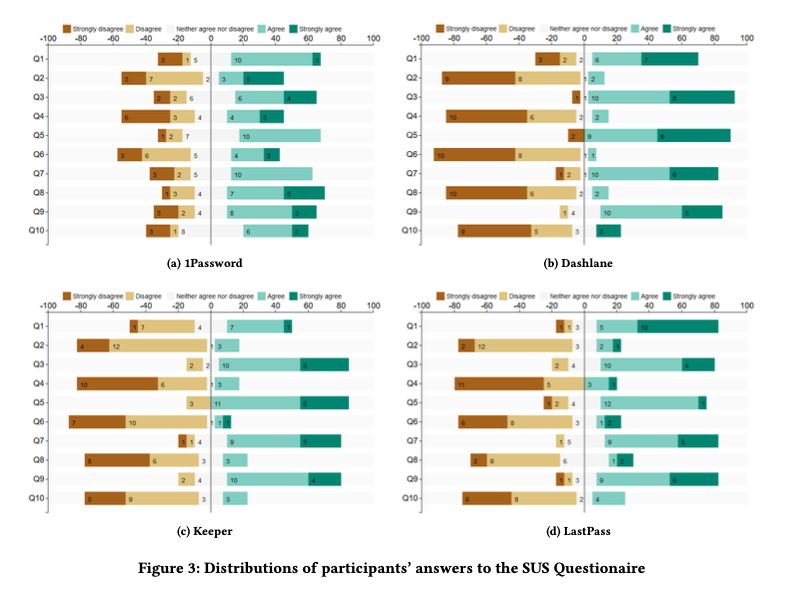
The authors also tried to understand the influence of demographics on the usability scores for each PM by using multiple linear regression and found that each model was not statistically significant.
Author Recommendations
The authors’ recommendations to improve password managers and adoption centered around three things: User Guidance and Interaction, Integration, and Security.
On the user guidance front, they detail how the PMs need to do three things:
-
educate users on what PMs are, how they help with security, and the role of master passwords
-
provide instructions on how to use basic functionalities
-
better explain the different security settings
The authors mention that this could be done with better help menus, tutorials, and instructions.
In terms of integration, the authors call out how their study found that not only was auto-fill the most useful feature, but also the most problematic. They recommend that mobile OSs offer better integration APIs and that native apps be more PM friendly.
When it came to security, the authors start by saying that better security leads to more user trust, which can foster adoption. Specifically, they speak to the different policies surrounding the master password for each of the PMs, with some accepting weaker passwords. They recommended having strong password policies for the master password, providing feedback for users through password strength meters, and offering additional levels of protection like MFA. Last, they talk about the trade-offs users make when adjusting security settings. They recommend that PMs provide additional feedback so users are aware of how the changes they’re making impact their security.
Wrapping Up
I thought that work by Seiler-Hwang et al. was particularly insightful and showed that there is still a lot of work that needs to be done to improve the usability of mobile password managers.
.. a comparison of three biometrics (voice, face and gesture) against traditional passwords, concluded that the latter were the most usable with a SUS of 78, still a higher score than that of current popular PMs.
My hope is that the entities developing them take this feedback and use it to develop more usable products because by doing so they will help reduce password reuse and improve the security of others.
References
[1]Nora Alkaldi and Karen Renaud. 2016. Why Do People Adopt, or Reject, Smart-phone Password Managers?. In 1st European Workshop on Usable Security (EuroSec2016). 1–14
[2]Elizabeth Stobert and Robert Biddle. 2018. The password life cycle. ACM Transactions on Privacy and Security (TOPS) 21, 3 (2018), 13